Implemented/In-Game Testing In-game Donation System (simplified process with no GM interaction needed)

Dan

Staff Member
Administrator
Game Master

New In-Game PayPal Donation System​

Heritage now uses a fully in-game PayPal donation system that delivers Sovereigns directly to your bank after you complete payment.

Quick Summary​

  • $1 USD = 100 Sovereigns
  • Whole dollars only
  • One active donation per account at a time
  • Payment is NOT auto-detected — you must click Claim in-game after paying
  • After a successful claim, you must wait for the next world save before starting another donation (this is intentional safety)


How to Donate (Step-by-step)​

1) Open the donation menu​

Type:
  • [Donate

2) Pick an amount​

You can choose:
  • Preset buttons: $5 / $10 / $25 / $50
  • Custom amount (whole dollars only)
Donation limits:
  • Minimum: $1
  • Maximum: $200

3) Get your PayPal link​

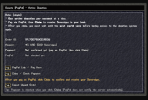
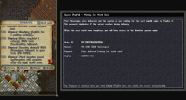
After creating an order, you’ll see a PayPal Link / Payment Instructions window that includes:
  • Your Order ID
  • Your donation amount (and how many Sovereigns it gives)
  • A PayPal URL (copy/paste if needed)
  • An Open PayPal button (tries to launch your browser)
If your browser doesn’t open automatically, the system also shows the link in your chat so you can copy it.

4) Pay on PayPal​

Complete the checkout on PayPal’s site.

5) Return in-game and click Claim

This is the most important part:

Sovereigns are delivered only when you click “Claim.”
PayPal does not “push” a notification to the shard automatically, so the server verifies payment when you click Claim.


What the Donate Menu Shows (Active Order Screen)​

If you already have an active donation order, the menu shows:
  • Order ID
  • Amount
  • Payment status (confirmed or not confirmed yet)
  • Buttons depending on the situation:
    • PayPal Link / Pay Here
    • Claim / Check Payment
    • Cancel Unpaid Order (only if it’s not paid yet)


Claiming: What to Expect​

If you paid successfully​

  • You’ll get a message like:
    • “Donation claimed! X Sovereigns delivered to your bank…”
  • Then it will say:
    • Final confirmation completes after the next world save

If you haven’t paid yet​

Claim will tell you something like:
  • “Not paid yet — complete PayPal payment, then click Claim again.”

If PayPal is still processing​

Sometimes PayPal may show the payment as pending; the system will tell you to try Claim again shortly.

If you have more than one pending order (rare)​

The Claim button can check multiple pending orders on your account and deliver any that are actually paid/claimable.


Delivery Location: Your Bank Box​

✅ Sovereigns are deposited into your bank, not your backpack.

If your bank is full​

If your bank doesn’t have room:
  • The donation is NOT lost
  • You’ll be told to:
    • Free up space in your bank and click Claim again
  • The system remembers that payment was received and will re-try delivery.


World Save Safety (Important)​

After your Sovereigns are delivered, the system may temporarily show:

“Waiting for world save to finalize.”

During this time:
  • You cannot start a new donation yet
  • This is a safety feature to prevent duplicate payouts if the server crashes right after delivery.
  • This also allows you to safely reclaim any Sovereigns that may be owed to you for a donation if the shard crashes between a donation and it's next save.
Once the next world save happens, your donation finalizes and the system unlocks for you again.

If the server restarts unexpectedly​

The system has crash-protection:
  • If it delivered Sovereigns but didn’t get a confirmed world save afterward, it can safely “re-open” the claim so you can try again without duplicating payouts.


Canceling an Unpaid Donation​

If you created an order but decided not to pay:
  • Open [Donate
  • Click Cancel Unpaid Order

Important notes:
  • Cancel only works for unpaid orders
  • If you already paid/approved on PayPal, cancel will refuse and tell you to Claim instead

If an order already expired/voided on PayPal, cancel/claim will remove it locally so you can start over.


Automatic Cleanup​

To prevent people from getting stuck forever with abandoned orders:
  • Unpaid orders that are over 24 hours old will be automatically cleaned up on the next shard restart (Heritage restarts daily).
  • Completed/paid-out donation records are kept for 90 days so staff can help if an issue comes up.


Common Problems & Fixes​

“I can’t create a new donation”​

You probably already have an active donation order.
  • Use [Donate
  • Either pay + Claim, or Cancel Unpaid Order

“I paid, but nothing happened”​

That’s normal until you press Claim.
  • PayPal does not notify the server automatically.
  • Open [Donate and click Claim / Check Payment

“Claim says it can’t deliver”​

Most often: your bank is full.
  • Free space in your bank
  • Click Claim again

“It says waiting for world save”​

You already received the Sovereigns.
  • Wait for the next world save to finish finalizing the donation.


Support Tip​

If you need staff help, keep your Order ID (shown in the Donate menu). It’s the fastest way for staff to track what happened.


In-game menus:
Donate1.png
Donate2.png
Donate3.png
Donate4.png

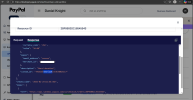
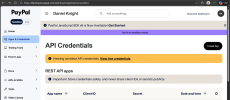
PayPal Logging (this is from the Sandbox but live is the same):
Sandbox1.pngAPI2.png
API3.png

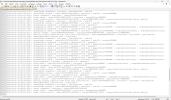
Server Side Logging:
Logs1.png
Logs2.png
 
OP
Dan

Dan

Staff Member
Administrator
Game Master
This system is going live on Heritage @ 7:30pm EST on 2/25/2026.

I did as much testing as I could in a Sandbox environment but now I need to actually do some real-world testing.

I want to point out that everything is logged. Every time the command is used, what account is using it, what character is claiming it, and what happens on the PayPal side. The total amount of Sovereigns in the world is also closely tracked related to donations and the accounts using/moving them.

PLEASE - if you find any exploits (ways to duplicate Sovereigns/bypass payments) with this system report them right away. You will be rewarded greatly. Anyone found exploiting this system during the earlier stages of testing will simply have their accounts, and any other accounts associated by IP, deleted and blocked.

Testing Event for the next couple of days 2/25 - 3/3:
  • Make five $1 donations (choose the custom amount) at different times using the [donate command (NOT THE TrueUO.com WEBSITE).
  • Try to claim without paying / find potential bugs with the system / create multiple orders per account (should not be possible).
    • Report any bugs or payment issues right away.
  • Once you have made all five, send me a PM on these forums or Discord so I can confirm in the logs.
  • At the end of the testing event, you will be given another 500 Sovereigns for free and have the backpack on a player of your choice hued the same colors as Sovereigns. (yes, this gray is the actual color)
Backpack.png

To preserve the integrity of the donation currency, if exploits are used and not found, and real damage is caused, Heritage will be reverted to a previous save/safe state.

Should everything go well I plan on making this script open source for the TrueUO community / any other shard owner that might be interested.
 
OP
Dan

Dan

Staff Member
Administrator
Game Master
Testing Event for the next couple of days 2/25 - 3/3:
  • Make five $1 donations (choose the custom amount) at different times using the [donate command (NOT THE TrueUO.com WEBSITE - currently disabled as we migrate).
  • Try to claim without paying / find potential bugs with the system / create multiple orders per account (should not be possible).
    • Report any bugs or payment issues right away.
  • Once you have made all five, send me a PM on these forums or Discord so I can confirm in the logs.
  • At the end of the testing event, you will be given another 500 Sovereigns for free and have the backpack on a player of your choice hued the same colors as Sovereigns. (yes, this gray is the actual color)
Backpack.png
 
OP
Dan

Dan

Staff Member
Administrator
Game Master
Thanks for the private feedback I have gotten so far.

List of things that will be changed in future updates/before it is officially announced in a publish:
  • After the testing event concludes the minimum donation accepted through the new in-game donation system will be $5.
    • The ability to input lesser amounts is only available while the system is being tested.
      • This is because of the PayPal fee structure:
        • Online Sales: 2.99% + $0.49 per transaction (Standard).
      • So, for every $1, $0.49 is deducted by PayPal immediately, then 2.99% of the remainder.
  • Currently once a donation is paid from the browser, the browser just returns the user to PayPal.com. In the next update it will instead send the user to a special landing page on TrueUO.com thanking them for their donation and explaining once again that they can now use the Claim button from the [donate menu in-game to claim their Sovereigns instantly into the bank box of the character that clicks said button.
  • Menus will be updated to better explain the flow. Use the [donate command to bring up the menu, select amount, get sent via browser to PayPal, pay the order, return to the menu via the [donate command, Claim Sovereigns in-game for the paid order.
 

PLAY NOW

Heritage

Address
play.trueuo.com
Port
2593
Uptime
12 hours
Players Online
15
Houses
875
Vendors
281
Gold
5,255,715,318gp
Top Bottom